




The Andre Motta binary options indicator generates signals without redrawing, easily adapts to market changes, and is easy to use. But is it worth trusting? Let's find out together how effective it is and whether it's worth the $155.
Its unique feature lies in its ability to analyze historical data and identify the best timeframes and assets for trading. This tool is perfect for both beginners and experienced traders. We've found a way to use it to achieve even greater profits in binary options trading. We'll cover this in more detail in our review.
Content:
- Characteristics;
- Installation;
- Overview and settings;
- Trading Rules by Andre Motta;
- Specifics of application;
- Conclusion;
- Download Andre Motta.
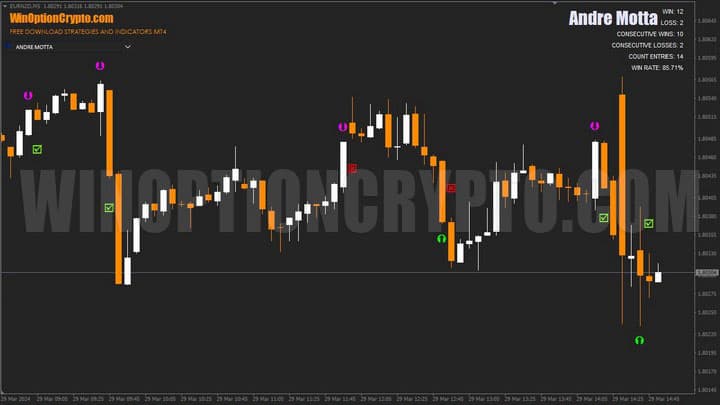
Characteristics of the Andre Motta Binary Options Indicator
- Terminal: MetaTrader 4
- Timeframe: M5
- Expiration: 1 candle
- Option Types: Call/Put
- Indicators:
- Trading instruments: currency pairs, commodities, cryptocurrencies, stocks
- Trading hours: 8:00 - 21:00 Moscow time
- Recommended brokers: Quotex, Pocket Option, Alpari, Binarium
Installing the Andre Motta Binary Options Indicator
The Andre Motta indicator is installed standardly on the MetaTrader 4 platform. To do this, add it to the terminal's root folder by selecting "File" in MT4 and then "Open Data Folder." In the folder that opens, navigate to the "MQL4" folder, then "Indicators," and then move all files there. Templates are installed in the same way, but placed in the "templates" folder. For more detailed installation instructions, watch our video:
Andre Motta's Binary Options Indicator Review and Settings
Please note: Users should pay close attention to the indicator settings and pop-up messages, as they are presented in Portuguese, which may lead to incorrect use of the indicator or selection of the wrong operating mode.
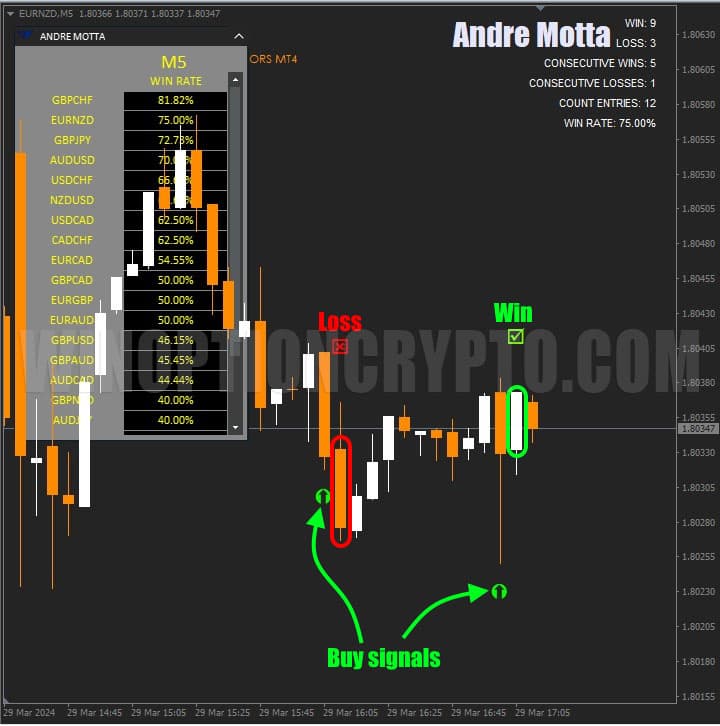
Andre Motta's binary options indicator displays position opening moments on the chart of the selected financial instrument using arrows. A purple arrow indicates a sell trade, while a green arrow indicates a buy trade.
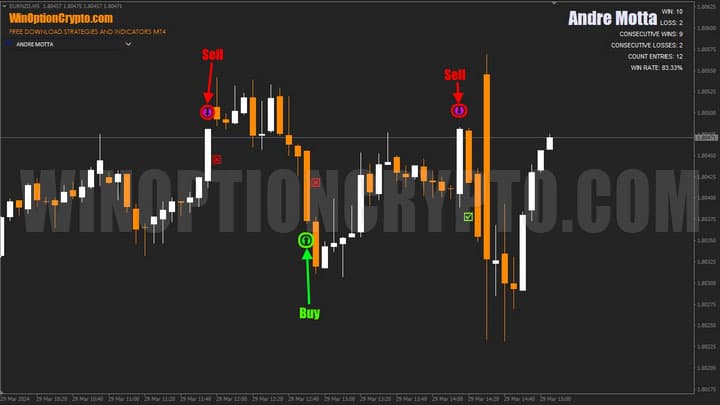
After receiving a signal, a mark appears on the next bar indicating its outcome: a red cross indicates a loss, a green check mark indicates a profit. The Andre Motta indicator calculates trading results in an unusual way, which we'll explore in more detail later.
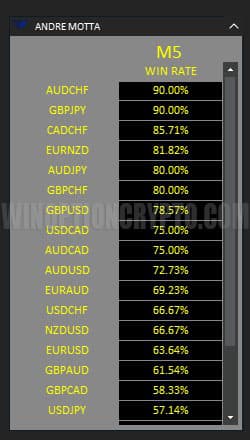
This technical analysis tool has a dashboard listing available currency pairs. The "Win Rate" column next to the currency code displays the percentage of profitable trades over a specified number of bars, which can be configured in the indicator settings.
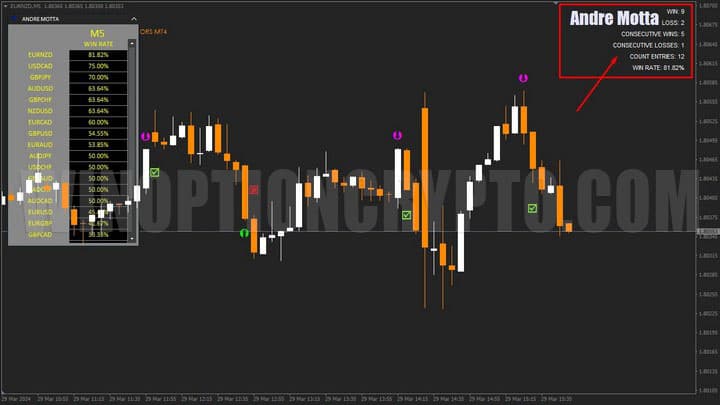
In addition to the information panel, the chart displays signal statistics for the current currency pair. Here you can see:
- total number of profitable trades (WIN)
- number of losing trades (LOSS)
- series of profits (consecutive wins)
- series of losses (consecutive losses)
- counting signals (count entries)
- win rate (WIN RATE).
Regarding the parameters, there are few of them, and they are written in Portuguese. Therefore, we will provide translations into Russian and English.
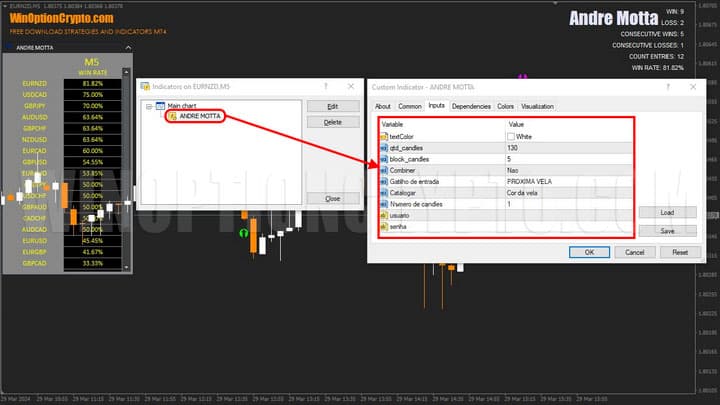
textColor – Color of statistics text
qtd_candles – Number of bars for indicator calculation
block_candles – Minimum number of candles until the next signal
Combiner – Activation of candlestick pattern search
Gatilho de entrada: RETRACAO / PRÓXIMA VELA – Entry trigger: Retrace / Next candle.
Catalogar: Cor da Vela / Taxa – Classification: Candle Color / Rate (Classification: Candle Color / Rate)
Numero de candles – Number of candles to hold positions
Andre Motta's Binary Options Indicator Trading Rules
The Andre Motta indicator has two operating modes: "Bounce" and "Next Candle." For binary options trading, the second mode is recommended, so all subsequent examples will be based on it. To activate it, you need to configure certain settings. We'll save them in a template so you can start trading immediately with a properly configured indicator.
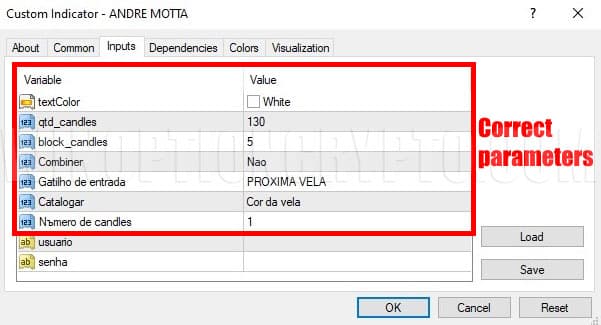
In this case, the indicator's statistics will take into account the close of the next candle following the signal. This is confirmed by the corresponding mark on the chart: a red cross indicates a loss, and a green check mark indicates a profit.
To increase your percentage of profitable trades, you can use additional technical analysis methods described in these articles:
- Technical analysis of binary options
- Technical analysis of cryptocurrencies
- Autochartist: Technical Analysis on the Go
- D. Murphy's book "Intermarket Technical Analysis"
When trading, try to choose currency pairs with the highest win rate. Additionally, to filter signals, you can use one of the trend indicators and open positions only in the direction of the trend.
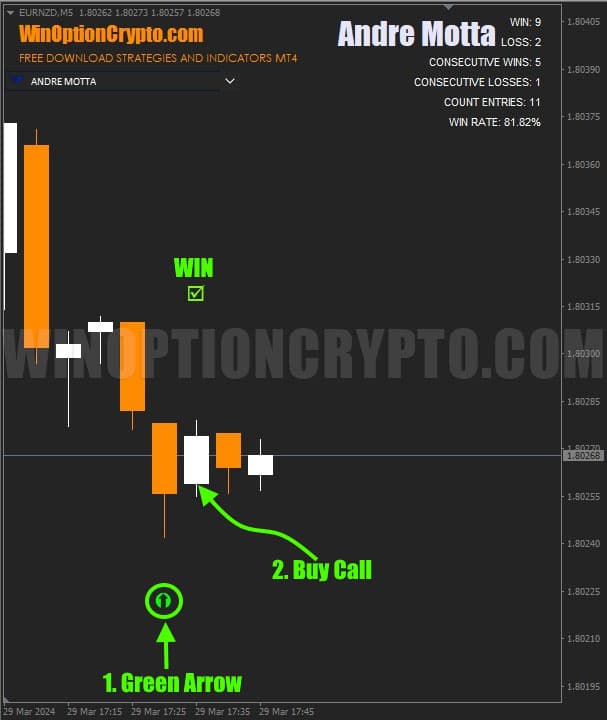
Opening a Call Option
- A green arrow appeared under the candle.
- At the opening of a new candle, we buy a Call
Opening a Put Option
- A purple arrow appeared above the candle.
- At the opening of a new candle, we buy Put
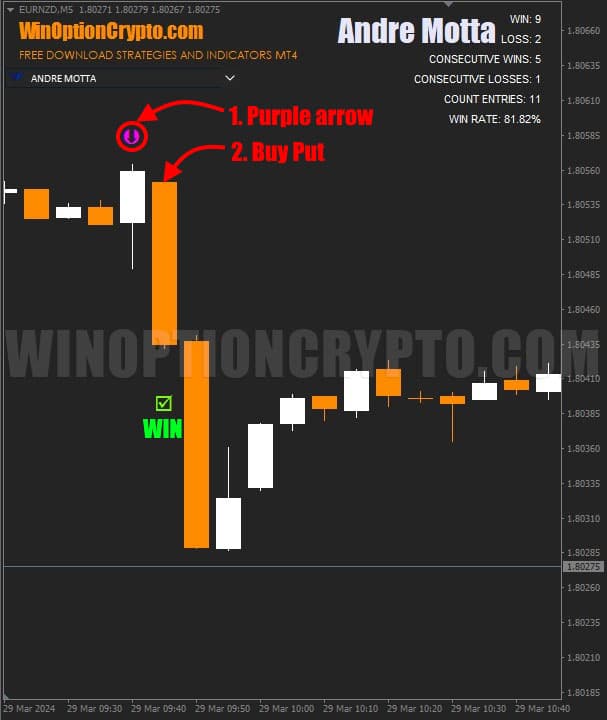
It is recommended to select an expiration time of 1 candle. Determine the position holding period based on the financial instrument and historical data testing results.
Specifics of Using the Indicator for Binary Options by Andre Motta
To maximize the effectiveness of the Andre Motta indicator, we recommend choosing an asset and timeframe with the highest win rate. To do this, study the signal success rate for currency pairs across various timeframes. You can further improve your trading with this indicator by using the Martingale method. However, given the increased risks of this approach to capital management, we do not recommend it for beginners. Instead, we suggest reading a selection of articles on this topic:
More experienced traders, on the other hand, may double their bet once after receiving a losing signal on the next candle. This often increases the percentage of winning trades, but don't get carried away, as it can easily lead to a series of escalating losses, which poses a serious risk to your account.
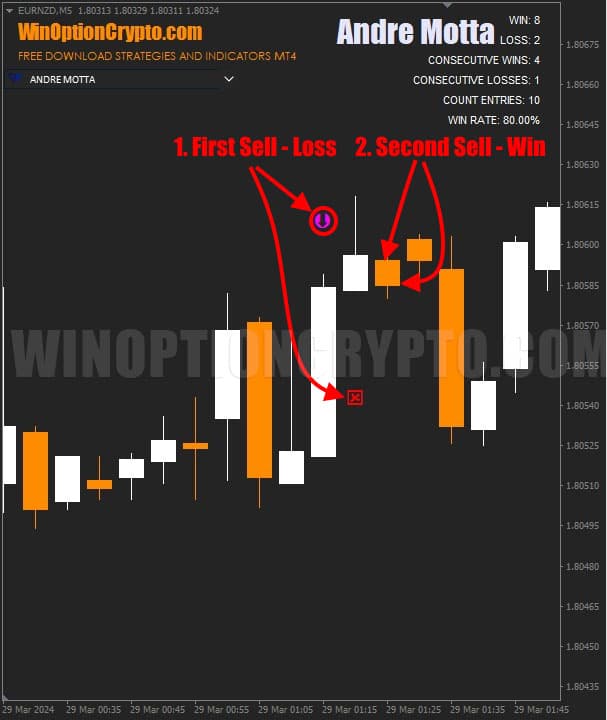
As shown in the screenshot above, the first sell trade resulted in a loss because the candlestick closed higher. However, the trade on the next candlestick resulted in a profit, and using the Martingale method, it would have been possible to offset the loss on the first trade and profit on the second.
Advantages of the Andre Motta Indicator
The signals are quite reliable. Whether you're trading stocks, cryptocurrency, or currency pairs, the algorithm of the Andre Motta binary options indicator is easily adapted to the specific market. Built-in statistical analysis of historical data helps identify the most promising instruments and timeframes for trading. The indicator is easy to use and suitable for beginners.
Cons of the Andre Motta Indicator
All settings and pop-up messages are written in Portuguese, which may lead to incorrect use of the indicator or selection of the operating mode.
Conclusion
The Andre Motta binary options indicator was developed specifically for the MetaTrader 4 platform and provides reliable trading signals for opening trades without redrawing. It also tracks its entry points and can be used for trading any financial instrument. The price of $155 is completely justified, as this tool offers a variety of opportunities for successful trading.
This binary options indicator easily adapts to changing market conditions and financial instruments, providing timely signals for opening positions. It can be successfully used by both beginners and more experienced traders, making Andre Motta an essential tool in every trader's arsenal.
To get started with the Andre Motta indicator, we recommend starting with a demo account with a reliable broker. Open trades while adhering to risk and capital management rules. Share your experience using this signal indicator in the comments. We wish you successful trading!
Download the Andre Motta Binary Options Indicator

To leave a comment, you must register or log in to your account.