




Andrew's Pitchfork in binary options trading is one of the few technical analysis tools that simultaneously helps determine trend direction, identify key support and resistance levels, and identify areas of the most likely price movement. This tool was developed by American trader Alan Andrews and is based on a simple yet effective idea: the asset price tends toward the median line of a channel, like a pendulum returning to the center. This property creates recurring and relatively predictable trading patterns. Although Andrew's Pitchfork is considered an advanced tool, any binary options trader willing to take the time to learn the basic principles of channel construction can master its logic.

In this article, we'll explore the Andrew's Pitchfork trading strategy on the Binarium platform, from correctly plotting the tool on a chart to options buy signals and risk management recommendations. You'll receive a guide that will allow you to move straight from theory to practice, test the strategy on a Binarium demo account, and see for yourself that a well-constructed pitchfork truly helps you analyze the market more accurately and open more informed trades.
Content:
- The Secret to Successful Trading on Binarium with Andrew's Pitchfork
- How to use Andrew's Pitchfork on Binarium
- Conclusion
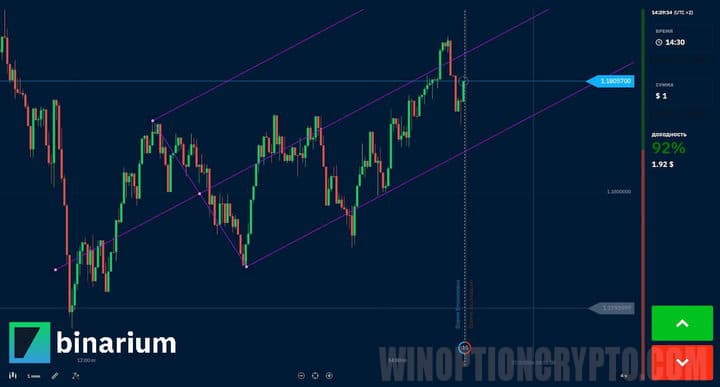
The Secret to Successful Trading on Binarium with Andrew's Pitchfork
The secret to successful trading with Andrew's Pitchfork lies not in the tool itself, but in understanding the market logic it reflects. The asset price moves within a channel most of the time and converges toward the midline. It is this characteristic that shapes the trading situations on which the entire strategy is built.
A trader who has learned to correctly select three pivot points for constructing a pitchfork, waits for signal confirmation at the channel boundaries, and avoids opening a trade every time the line is touched, gains a tool with highly accurate forecasts. Adding disciplined capital management and consistent application of the rules, Andrew's Pitchfork can be transformed from a graphical element into a fully-fledged trading system, convenient for use on the Binarium platform.
How to Use Andrew's Pitchfork on Binarium
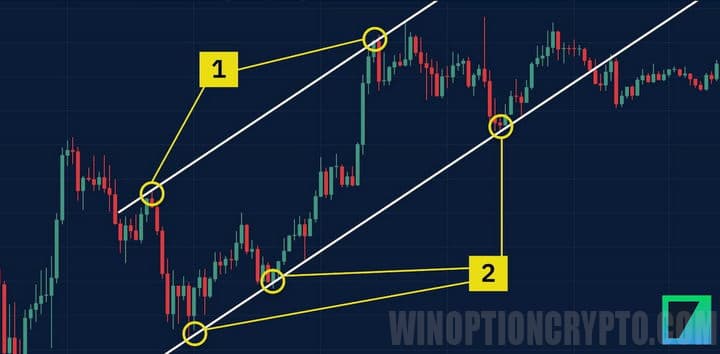
First, draw straight lines through the highs (1) and lows (2) using the "Segment" graphic tool. Then, visually determine the price movement direction. In this case, it's upward.
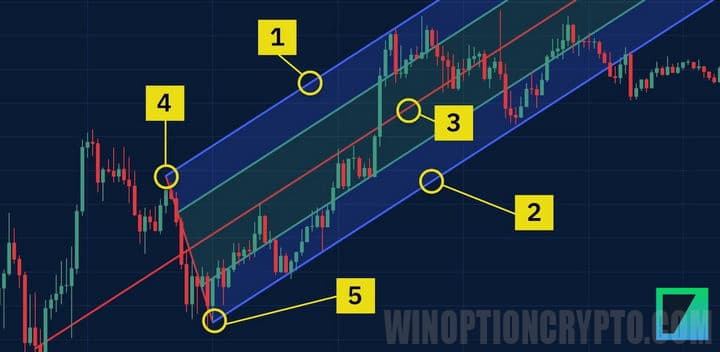
Then select the Andrew's Pitchfork tool and position it so that the outer lines align with the lines drawn through the highs and lows. The local high (4) should be on the resistance line, and the local low (5) should be on the support line.
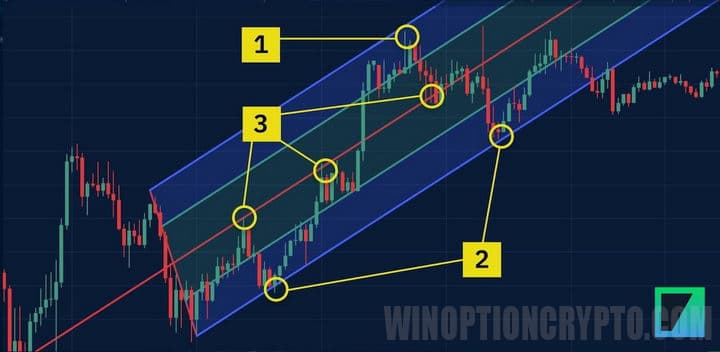
Statistically, the price retraces to the channel's midline in 60–65% of cases, so trades should be opened when one of Andrew's pitchfork's boundaries is touched. For example, if the price approaches the upper boundary (1), a put option should be opened. If the price approaches the lower boundary (2), a call option should be opened.
When the price fluctuates around the center line, it is not recommended to open trades, as quotes can move in any direction.
The expiration time for this strategy should be set within 3-5 candles, investing no more than 2% of the deposit in one trade.
Conclusion
Proper use of Andrew's Pitchfork can significantly improve the quality of analysis and the accuracy of binary options trades. In this review, we examined the logic behind channel construction, learned how to identify key signals at the pitchfork boundaries, and understood how to use the median line as a trading guide.
Now you need to open a demo account with the Binarium broker, select a suitable asset, plot the pitchfork on a real chart, and execute your first trades according to the described rules. This hands-on experience will demonstrate how this graphical tool works in real market conditions, help develop the skill of accurately identifying pivot points, and build the confidence needed to move on to a live account and consistently trade binary options.
Having trouble understanding how this strategy or indicator works? Let us know in the comments below, and subscribe to our WinOptionCrypto YouTube channel, where we'll be sure to answer all your questions in a video.
To leave a comment, you must register or log in to your account.